
NYTimes: US and Global News
The New York Times CompanyNews & Magazines
4.723.08K Reviews
- Version
- 11.99.0
- Installs
- 10.00M
- Age Rating
- Everyone 10+
Screenshots



Our Review of NYTimes: US and Global News
 Analysis by Appyee
I judge a news app not only by how quickly it gets a headline onto my screen, but by how well it lets me choose what deserves my attention. A steady stream of alerts can make it easy to feel informed while leaving little room to understand a story. I find the NYTimes: US and Global News most useful when I treat it as a place to follow reporting in depth, rather than as a feed I have to keep checking all day.
A newsroom in a crowded news routine
The app comes from The New York Times Company and sits in the news and magazines category, where it competes with newspaper apps, broadcasters and general-purpose news aggregators. Its particular appeal is the combination of a recognizable publication, coverage across subjects and formats, and tools for returning to stories. That makes it a better fit for readers who want a few substantial reads than for someone who only wants a single, quick roundup of headlines.
There is a practical distinction between opening a publication’s own app and using an aggregator. An aggregator can be convenient when I want to compare many outlets in one place; here, I am choosing a more focused reading experience. That focus can help me follow a developing subject without hopping between a collection of unrelated feeds, but it also means the app is not a substitute for deliberately checking other sources when I want a wider range of editorial perspectives.
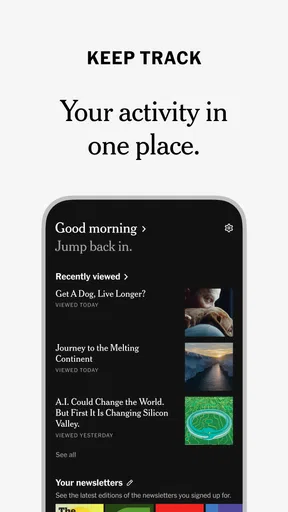
For a realistic morning routine, I might scan the leading stories over breakfast, save one longer piece for a commute, and leave alerts off until I have time to read them. The point is not to consume every headline. It is to use the app’s sections and saved reading as a small, manageable queue. That approach suits a busy day better than opening the app repeatedly whenever a notification appears.
Visible choices and the limits of what I can judge
I value clear controls, but I separate what I can see while using an app from claims about its unseen data practices. The app gives readers visible ways to navigate and engage with its journalism, including personalized recommendations, saved stories and alerts. Those are useful choices about the reading experience. They do not, by themselves, tell me what information is collected behind the scenes, so I would not treat a tidy interface or a personal feed as proof of a particular privacy approach.
Personalization is convenient when I want more coverage of topics I already follow, yet it can narrow what I encounter if I rely on it too heavily. I use a personalized section as a starting point, then deliberately browse beyond it when I want to see what else is being covered. This is a small habit, but it helps keep convenience from turning into an invisible filter on my daily reading.
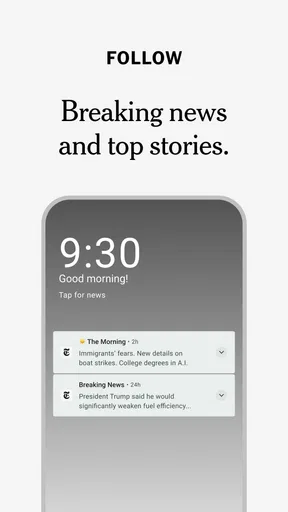
Alerts involve a similar trade-off. A developing story can matter enough to interrupt the day, but a phone that buzzes for every update is no longer helping me pay attention. I would start with only the notifications I genuinely want, then adjust them after seeing how they fit my routine. If I am in a meeting, driving, or trying to concentrate, I would rather read a considered update later than feel obliged to open each alert immediately.
Access, cost and deciding whether it suits you
The app is free to download, though some journalism is behind a subscription paywall and in-app purchases are available. I would install it first and explore the reading experience before deciding whether paying makes sense for me. A subscription is most compelling when I return often for full articles, reporting across several subjects, or deeper background; a casual reader who only checks a headline now and then may find the free experience enough.
Because access can vary by article, I would not build a reading routine around assuming every story will open in full. If I meet a limit while following a developing issue, I can decide whether that particular coverage justifies a subscription rather than making the decision in the abstract. The app is free, rated for Everyone 10+, and has a 4.7 average from around 197,000 ratings, but those figures do not settle the personal question of whether its mix of reporting and paid access suits my habits.
One useful test is to notice what I actually do during a normal week: do I save long reads, return to ongoing coverage, or listen and watch as well as read? If so, the app’s breadth may earn a place in my routine. If I only want a quick glance at top headlines, a free broadcaster app or a general news aggregator may be less demanding. The New York Times app has over 10 million installs, but popularity is context, not a reason on its own to subscribe.
What I would check before settling in
For readers cautious about accounts and personal information, I would make a brief settings check part of the first session. Review the choices the app presents for alerts and account access, and decide what you want enabled rather than accepting every prompt automatically. I would also avoid assuming that a saved story is a private note or that personalization is a privacy control: those tools shape reading, and their labels should not be stretched into claims about data handling.
That caution is not a reason to avoid the app; it is a sensible way to use any publication app that asks for attention and may offer account-based services. I would keep my own standards simple: grant only permissions that make sense for a feature I intend to use, revisit notification choices if they become noisy, and consult the app’s current privacy and account controls when I need a definitive answer about how information is handled. Those are better safeguards than guessing from the interface.
On iOS or Android, the practical questions are much the same: can I read enough without paying to judge the experience, will the alerts fit my day, and do I want a publication-focused source rather than a bundle of outlets? The app is currently at version 11.60.0, and it requires operating system version 10 or later. In-app purchase prices range from $0.99 to $299.99 per item, so I would inspect the actual offer shown in the app before buying rather than assume one price applies to every option.
That price range also makes it worth pausing at a purchase screen and checking exactly what is being offered, for how long, and under what renewal terms. I would not tap through simply because I have reached a paywall in the middle of an interesting article. If I read the publication regularly, the subscription may be worthwhile; if my interest is occasional, waiting, using the free access available, or choosing another source can be the more sensible decision.
First Impressions and User Interface
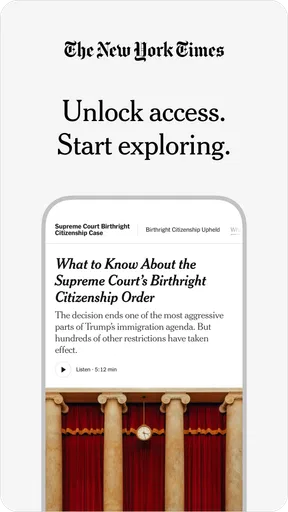
When you first open the NYTimes: US and Global News app, you're greeted with a clean and intuitive interface. I mean, there's no fuss—just the news you need, front and center. The navigation bar at the bottom is super straightforward with sections like "Top Stories," "For You," and "Saved." It's like they read my mind and organized everything just how I would’ve wanted.
The design is sleek, with a minimalist vibe that doesn’t distract from the content. It's almost like flipping through a well-organized magazine, but without the paper cuts. I appreciate that the headlines are bold and easy to read, making it simple to decide what piques my interest.
Features That Make It Stand Out
Now, what really sets this app apart are the features. First off, the "For You" section is a game-changer. It curates articles based on your reading habits. So, if you’re into tech or politics—or both—it’ll have you covered without needing to sift through everything else.
Another highlight is the "Morning Briefing." It’s perfect for those of us who want a quick summary of the day's top stories. It's like having a personal news assistant who knows exactly what you need to start your day informed.
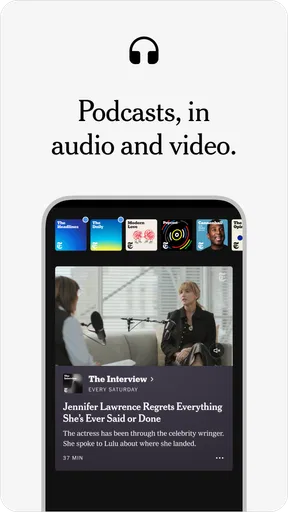
Also, let’s talk about the multimedia content. The app isn’t just about reading; it offers videos and podcasts too. The quality is top-notch, and it’s a fantastic way to consume news when you’re on the go. Whether you're commuting or just chilling on the couch, the app adapts to your lifestyle.
Subscription and Access
Alright, we need to chat about the subscription. Yes, the app does have a paywall, but hear me out. With a subscription, you get full access to all articles, including archives. This is a goldmine for anyone who loves deep dives into topics or catching up on past events.
There are different subscription tiers, and they often have promos running, so keep an eye out for those. Trust me, the quality of reporting and the depth of coverage make it worth the investment. Plus, supporting quality journalism is always a plus in my book.
Personal Experience and Opinion
So, what’s my take? I've found the NYTimes: US and Global News app to be an indispensable tool for staying informed. It's more than just an app; it's like having a newsroom in your pocket. The range of topics covered is vast, and the quality of writing is consistently high.
I particularly enjoy the opinion pieces and editorials which challenge my perspective and keep me thinking. Not to mention, the "Breaking News" alerts are timely and ensure I never miss a beat, even on a busy day.
Final Thoughts
In a world where information is constant and sometimes overwhelming, the NYTimes app strikes a balance between depth and accessibility. It’s designed for readers who want more than just headlines. Whether you’re a news junkie or just looking to stay informed, this app is a must-have on your device.
So, if you haven’t tried it yet, give it a download. Dive into the stories, explore the features, and see how it fits into your daily routine. Trust me, your future, well-informed self will thank you.
Privacy and Permissions
See what permissions an app requests and how it handles your data.
- Camera
- take pictures and videos
- Wi-Fi connection information
- view Wi-Fi connections
- Other
- view network connections, full network access, run at startup, control vibration, prevent device from sleeping
Verdict
Strengths of NYTimes: US and Global News
- Comprehensive news coverage.
- User-friendly interface.
- Customizable notifications.
- Offline reading available.
- High-quality journalism.
Limitations of NYTimes: US and Global News
- Subscription required for full access.
- Occasional app crashes.
- Ads in free version.
- Limited video content.
- No dark mode option.
Other Releases by The New York Times Company
View All


Similar Picks in This Category
View All
Google News - Daily Headlines
Google LLC4.0

X
X Corp.4.8

Flipboard:Your Social Magazine
Flipboard3.4

Opera News: breaking & local
Opera4.5

Hindi News by Dainik Bhaskar
Dainik Bhaskar Group4.0

Way2News Daily News App
Way2News ( Formerly Way2SMS )4.6
Frequently Asked Questions
What features does the NYTimes: US and Global News app offer?
The NYTimes app provides users with access to the latest US and global news, offering in-depth articles, interactive multimedia features, and personalized notifications. It includes sections such as Politics, Business, Technology, and Opinion, allowing users to explore a wide range of topics. Subscribers can enjoy unlimited access to all articles and exclusive content.
Is an internet connection required to use the NYTimes app?
Yes, an internet connection is needed to access the latest news and updates. However, the app does offer an offline reading mode, allowing users to download articles for later reading without an internet connection. This feature is particularly useful for users who want to catch up on news during commutes or in areas with limited connectivity.
How does the subscription model work for the NYTimes app?
The NYTimes app offers both free and paid subscription models. While non-subscribers can access a limited number of articles each month, subscribers enjoy unlimited access to all content, including premium articles and features. Subscription plans are available on a monthly or annual basis, with discounts often offered for long-term commitments.
Can I customize my news feed in the NYTimes app?
Yes, the NYTimes app allows users to personalize their news feed based on their interests. Users can follow specific topics, authors, or sections, ensuring they receive news that matters most to them. Additionally, the app sends personalized notifications based on user preferences, keeping them informed about breaking news and updates.
Is the NYTimes app available on both Android and iOS?
The NYTimes app is available for both Android and iOS devices. It can be downloaded from the Google Play Store for Android users and the Apple App Store for iOS users. The app is regularly updated to ensure compatibility with the latest operating systems and to introduce new features and improvements.
